Showing posts with label pinterest. Show all posts

Friday, October 24, 2014

Friday Five Hop and Five Easy Steps to More Pinnable Posts

Welcome to the Friday Five!  Each week we feature a post with 5 things and we invite you to do the same!  Read on for this week's post from our state rep Ellie, and then link up your Friday Five post below!


Hey everybody! I am Ellie from ellie petrov: GEEK | LIFE | HOME (formerly Creative Geekery) and I am super excited to share some ideas with you today that will make your posts stand out on Pinterest AND at linkup parties. As the creator and co-host of THE Pin It Party I have looked at thousands of posts over the last year and a half, given the task of choosing the three most pinnable posts each week. Let me back up a second and explain what I mean when I say "pinnable." A super pinnable post is something that I want to pin to one of my boards before I have even had a chance to read it! Ok, so how do we create these potential pins? Here are my thoughts:

1. Come up with a great title. Coming up with a catchy title can be tough but it is worth the time and effort. While clear and concise titles are great for SEO (search engine optimization), don't be afraid to have a little fun once in a while. I am much more likely to click on a post called, "THE Printer That Changed My Life" instead of "Canon OfficeJet Review." And even if you do go for a simpler, more SEO-friendly title, don't be afraid to jazz it up when you are sharing it at linkup parties. You can edit the title that will appear at the party so have some fun.

2. You need at least one killer image WITH TEXT. This is probably just my personal preference but I really like to know what the post is about in the image I see on Pinterest. Yes, I can read the description but I my attention span is short. Add some text even if it is just hinting at the content of the post. Also, don't forget to watermark your image. You don't have to do anything fancy. Just add your blog's URL in a cute font. Turn the transparency of the text down a little if you want to be a little fancy. In terms of the image, I take pictures of random things ALL THE TIME with my iPhone just in case I might use it for a post. It might be a cool table top, a painted wall or a great evening sky. It is nice to build up a little stock photo library of your own that you can tap into. Also check out Canva. This site is a gold mine for bloggers! They have templates for all different types of graphics as well as tons of free images. Can't find a great free image? Splurge on one of their many stock photos available for $1 a piece.

3. Make sure your image looks good as a square. If you like to share your posts at linkup parties, this one is HUGE for you. Every linkup party I have ever seen or hosted allows each post to share one thumbnail image. That image is always SQUARE! If you are a lover of all things rectangular, go with your bad self. Just make sure the text is within the square. Cut-off text at a linkup is a huge turn off.

4. Consider a DSLR camera (or a better camera app). If you already own one, consider taking the time to learn how to use it. I think this is true for all bloggers but particularly for you food bloggers out there. I have seen some pins float through my feed that sound magnificent but the picture is a total turn off. If you are looking to really get to know your DSLR camera, check out my Pinterest Photography board chock full of great tips and tutorials. For some amazing tips minus all of the technical jargon, check out this post from food blogger Anyonita! A couple of awesome camera apps that really do a nice job and are worth the couple of bucks: Camera+ and ProCam.

5. Study Pinterest. Really take some time to look at Pinterest and see what catches your eye. I am not saying that you should copy other bloggers but use what you see as inspiration. What kind of fonts appeal to you? What kind of pictures? What pins would you be willing to pin without even reading the posts? What turns you off about certain pins? Make some mental (or actual) notes and keep those handy for creating your own super pinnable posts.

Happy blogging! XO, ellie

p.s. THE Pin It Party goes live every Wednesday night at 10 pm EST! Would love to see you and your pinnable posts there!

And now it's your turn!  Link up your Friday Five post below!


Connect with us!
Twitter Pinterest Facebook Bloglovin

Tuesday, September 30, 2014

September Pinterest Link Up!

Welcome to the September Pinterest hop!  Grow your Pinterest following by linking up your account below!  Please be sure to follow others in the hop!
Please link up to your Pinterest account only, not to your blog or other social media pages!  This month we will have two link ups- the first one is to link up to your profile for people to follow you. The second one is to link up pins you want repinned!  
Link up your Pinterest Profile for follows here!  Please follow at least 3 new people when you link up!

Link up your pins here.  You can link 1-3 recent pins you would like repinned! Please be kind and repin others in the link up as well! We will also be pinning some of the posts in the link up to our Northeast Bloggers account!


Connect with us!
Twitter Pinterest Facebook Bloglovin

Tuesday, August 26, 2014

August Pinterest Hop!


Welcome!  This Tuesdays social media hop is Pinterest!  Please link up directly to your pinterest profile, not your blog or other social media sites! Don't forget to follow Northeast Bloggers on Pinterest while you're at it!


Connect with us!
Twitter Pinterest Facebook Bloglovin

Tuesday, May 27, 2014

May Pinterest Hop!

Welcome!  This Tuesdays social media hop is Pinterest!  Please link up directly to your pinterest profile, not your blog or other social media sites! Don't forget to follow Northeast Bloggers on Pinterest while your at it!

Be sure to follow 3-5 others in the hop and just for fun go ahead repin a few of their pins!

Connect with us!
Twitter Pinterest Facebook Bloglovin

Tuesday, April 15, 2014

April Pinterest Hop!

Welcome to the April Pinterest hop!  Grow your Pinterest following by linking up your account below!  Please be sure to follow others in the hop!

Please link up to your Pinterest account only, not to your blog or other social media pages!

Connect with us!
Twitter Pinterest Facebook Bloglovin

Monday, March 3, 2014

Pin Committee 2.0


Thanks to those of you who have been following along and linking up with our Pin Committee each week!  We have decided to move to the Pin Committee link up to our Facebook group, starting this week.

So hop on over to the Facebook group and join the fun there!  
 
And please keep the following guidelines in mind:

1. Link up directly to your pin that you want repinned.
2. If you link up a pin, please re-pin at least 5 others in the link up (meaning you might have to check back later to get to 5)
3. Links that are not directly to the pin, and links to other things unrelated to the pinterest link up will be removed from the linkup.  The idea behind the Pin Committee is to gain more repins on your pinnable content.

On that note- what is "pinnable content?"  We'd all love to see more traffic to our blogs, but not all blog posts fit into the pinnable category.  For example, my post on my family trip to the beach has a lot of cute pictures of my son at the beach, but doesn't give the reader any information that they might find useful, besides what I did at the beach.  This is not a pinnable post.

Examples of pinnable posts include: recipes, how-tos, crafts, activities, tips, fashion, or guides.  A good trick is to think "does this post contain information others might find useful?"

Thanks everyone & see you over at Facebook for the link up!  Please let us know if you have any questions about this!


Connect with us!
Bloglovin //Twitter //Pinterest //Facebook

Tuesday, February 25, 2014

Anything Goes Social Media Link Up!


As part of our anniversary celebration week we are doing an "anything goes" social media link up today!  So, instead of just linking up one certain kind of account, you can link up whatever you want!  You can link up as many or as few social media accounts you heart desires!  So, if you want more instagram and google+ followers, link up those!  If all you want in pinterest follows, link up that one!  Or do all five!

The only "rule" is, if you link up, please do go follow at least 5 others in the hop!  

After all, the point of linking up is to gain more followers on you social media accounts, so let's all help each other out with some follows!

Connect with us!
Bloglovin //Twitter //Pinterest //Facebook

Monday, February 24, 2014

Pin Committee #5


Welcome to the Pin Committee link up!

Do you have a "pinnable" post from last week that you'd love to see more traffic to from Pinterest?  Then this link up is for you!  Link up below with your most pinnable post from the last week. 
Remember to link up a new post from the previous week only.  Please do not link up with the same post as you did last week, it will not be pinned twice by our committee!  The link up is open on Monday only, and the committee will work on pinning your content throughout the week.

Please do the following when you link up:

Follow our Pin Committee members on Pinterest 
(and their blogs too if you'd like!)
and
Participate by helping Pin a few other post in the link up!

Please keep in mind- only post that are "pinnable" will be repinned by our team.  For example: tips, how-tos, recipes, kids activities, travel tips etc.  If you have any questions about this please let us know.

Meet our Committee: 

Emily of Words I Wheel By Follow Emily
  NJ of A Cookie Before Dinner Follow NJ
 

Please note- starting next Monday, March 3, the Pinterest link up will switch over to be hosted on our Facebook group page.  If you aren't part of our Facebook group, check in your welcome email from us for the link!  The link up will be a weekly thread with group participation.  If you link up a pin, you will also then repin the others in that thread.  More information will be given on that link up next Monday!

Connect with us!
Bloglovin //Twitter //Pinterest //Facebook

Monday, February 17, 2014

Pin Committee #4


Welcome to the Pin Committee link up!

Do you have a "pinnable" post from last week that you'd love to see more traffic to from Pinterest?  Then this link up is for you!  Our Pin Committee wants to help you increase your Pinterest traffic and here's how:

Link up below with your most pinnable post from the last week.  Our Pin Committee will then work on pinning your post!  Combined, our committee has thousands of followers, so you know your post will be seen!

Remember to link up a new post from the previous week only.  Please do not link up with the same post as you did last week, it will not be pinned twice by our committee!  The link up is open on Monday only, and the committee will work on pinning your content throughout the week.

Please do the following when you link up:

Follow our Pin Committee members on Pinterest 
(and their blogs too if you'd like!)
and
Participate by helping Pin a few other post in the link up!

Meet our Committee: 

Monday, February 10, 2014

Pin Committee #3


Welcome to the Pin Committee link up!

Do you have a "pinnable" post from last week that you'd love to see more traffic to from Pinterest?  Then this link up is for you!  Our Pin Committee wants to help you increase your Pinterest traffic and here's how:

Link up below with your most pinnable post from the last week.  Our Pin Committee will then work on pinning your post!  Combined, our committee has thousands of followers, so you know your post will be seen!

Please do the following when you link up:

Follow our Pin Committee members on Pinterest 
(and their blogs too if you'd like!)
and
Participate by helping Pin a few other post in the link up!

Meet our Committee: 

Thursday, February 6, 2014

Northeast Bloggers Team Openings & a little giveaway!

As we grow and expand our network we continue to expand our team and reorganize as needed!  The Northeast Bloggers Network is currently looking to fill the following positions:

State Representatives:  State Reps are leaders in the NE bloggers community and will be responsible for helping promote the Northeast Bloggers community as well as promoting bloggers from their state.  They may also plan blogger meet ups for the state they represent and help provide resources to bloggers.  Lastly, state reps will work with me on coming up with ideas for the network and new ways to improve our community!  Click here to learn more about the position benefits, responsibilities and qualifications!

We are currently looking to fill the following State Rep positions:
-Maryland/Delaware
-Vermont
-New York- NYC specific
-Pennsylvania- West (Pittsburgh etc)

Pinterest Administrator:  The Pinterest admin will be responsible for running the Northeast Bloggers pinterest account.  They will have the liberty to organize the boards, follow members pinterest pages, repin members pins from the news feed etc.  They will also work with the Pin Committee link up on Mondays.

If you are interested in either the State Rep or Pinterest positions, please apply by emailing us your info!

And now on to our give away!  This week we are giving away TWO Featured Memberships!  Not only will your blog be listed in our normal blog directory, you will also be featured on our main page blogroll, as well as other surprise perks throughout the year!  This giveaway is for members of our community, or bloggers who are in the process of applying for membership, only!

Enter via rafflercopter below!
a Rafflecopter giveaway
Connect with us!
Bloglovin //Twitter //Pinterest //Facebook

Monday, February 3, 2014

The Pin Committee Week #2


Welcome to the Pin Committee link up!

Do you have a "pinnable" post from last week that you'd love to see more traffic to from Pinterest?  Then this link up is for you!  Our Pin Committee wants to help you increase your Pinterest traffic and here's how:

Link up below with your most pinnable post from the last week.  Our Pin Committee will then work on pinning your post!  Combined, our committee has thousands of followers, so you know your post will be seen!

Please do the following when you link up:

Follow our Pin Committee members on Pinterest 
(and their blogs too if you'd like!)
and
Participate by helping Pin a few other post in the link up!

Meet our Committee: 

Friday, January 31, 2014

All About Pinterest Part 2!


Welcome to part 2 of our All About Pinterest series!  In part 1 we discussed why Pinterest is beneficial to bloggers, how to get started, how to pin new content and quick tips for Pinterest-blog harmony.  Click here to check out Part 1!

The next step after pinning content is the repin.

So let's talk about re-pinning.  Besides pinning from your own blog or other websites you like, you can also repin from your news feed.  Repinning is a very easy way to save pins you love, but you should keep in mind that not all pins are what they appear to be!  Sometimes you repin something that looks really great, like a recipe or an outfit or a how to.  Later you go back to check out that pin only to find the site is spam, or has no directions, just pictures.  Here are some tips from our Pinterest expert, Ellie, on how to avoid "repin disappointment":

1. Always click on the pin! Sometimes pages aren’t there anymore, the link is wrong, or it simply isn’t as described. Just take two seconds, click, and if it works and it looks like something you want to hang on to, REPIN.

2. If it is a recipe, click on the pin and check the COMMENTS section of the post. If there are no comments, then it is a gamble but usually there are and they can be super helpful and honest. If 20 people write and say they just can’t get that no-knead bread to rise, chances are it is not a great recipe. There may also be tips on how to make the recipe better or more healthy so it is a win-win.

3. If it is something you would like to buy, click the link to see if it goes to a store, if it is still available, and if it is in your price range. Sometimes I will just repin something because I like the photo or just want something similar BUT if it is something I am pinning because I would really like to own that exact thing, I click first.

Quick and easy- how to repin:


Step 1: Click the pin you want to repin from your news feed.  It will open up in this screen and you click "Pin It."  There is also an option to "like" a pin, but that does not allow you to organize it in your boards, nor does it show up in your feed.  Therefore, the pin itself will not get more traffic, which is counterproductive if you are trying to help a friend out by repinning their content.


Step 2:  Choose the board you want your pin to go to.  Then check the description to see if it says something helpful to you.  You can change the original description if you want.  Then, click Pin It, and there you have it!

Now we know all the basic things to do on Pinterest so let's get a little more advanced!

How to add the pin it button to your blog.

This is different than the pin it button you added to your web tool bar!  Adding the pin it button to your blog allows people to pin directly from your blog, even if they don't have the pin it button in their own toolbar.  This can be beneficial to you for getting more pins to your blog!

The most simple way to add this is to use the Pinterest Widget Builder. Which looks like this:


As you can see, from the widget builder screen I can build a pin it button, follow button and profile widgets.  The pin, profile and board widgets are great to show off a pin or board in your blog posts or you can add them to your sidebar to show off your profile!

Here is another tutorial on how to add a pin it button to your blog posts.  This one discusses how to add coding to your blog so the pin it button shows up in every post.  There are several other tutorials out there, let us know if you find a good one that worked for you!  Just in case that one doesn't work for you here is another option!  This blog also reminds us to back up our blogs before making any changes to our HTML codes- great tip!

If you don't understand any of this or don't want to deal with HTML coding, you can also hire a blog designer to add a custom pin button for you!  Generally (from what I've seen) they charge $15-$25 to add a custom pin it button to a blogger blog.

Pinterest Reminders for good pins:

1. Make sure you blog post has clear, original images or graphics that are attractive.

2. Add a description that is catchy, relevant and useful.

3. Make sure your link works!  Be sure to link directly to the post, not the main URL of your blog.  If people click through from Pinterest to your blog, they want to see the content they are clicking on from Pinterest, not just your blog in general.

Last but not least, I will leave you with this infographic with some helpful Pinterest statistics:


Happy Pinning Everyone!! 

Did you enjoy our Pinterest series? Please let us know, if more members are interested we can add to this series in the future!

Connect with us!
Bloglovin //Twitter //Pinterest //Facebook

Thursday, January 30, 2014

All About Pinterest Part 1: Why Use Pinterest & How to Get Started

On Monday we started our new hop which is a Pinterest link up.  You might be wondering why we started this up, and how Pinterest can be beneficial to you!  We hope to answer all your questions and more in this two part series All About Pinterest!


Why should I use Pinterest?

It's pretty straightforward: Pinterest is one of the top ways to drive traffic to your blog.  Besides perusing for recipes, home decor and cute puppy pictures there are tons of great ideas on there- and one (or more) of those ideas can, and should, be yours!  Pins from your blog post drive traffic directly to your blog and give you more exposure.  Hopefully, people coming from Pinterest like what they see in that post and stick around for more.

While looking at my blog statistics I see that Pinterest is second in the list of referring sites.  That's second only to google searches.  It is also fourth on the list of referring sites after bloglovin.  And I don't even have very many pins connected to my blog, so you can just imagine how much higher on the list it could be, had I pinned more of my posts!

So let's talk about how to get started!

Setting up your account is easy, just sign in using Facebook, Twitter or your email.  Follow the directions to set you account up.


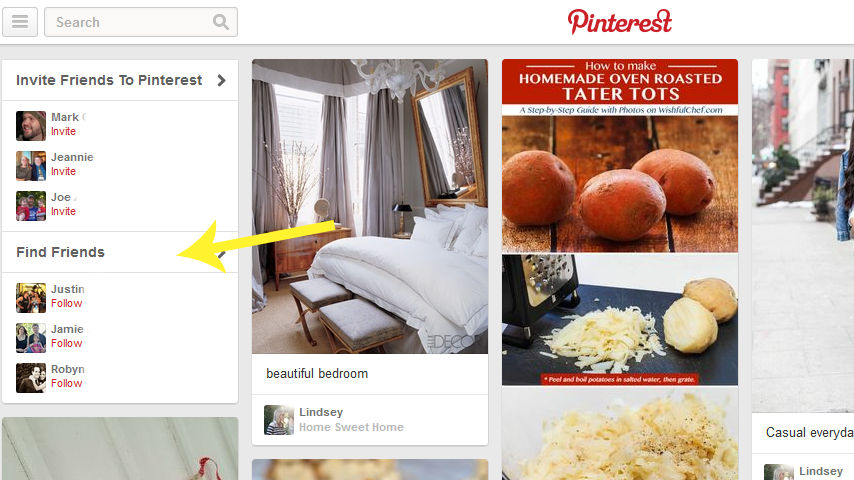
The next step is to follow follow follow!  Pinterest suggests people you may know through the social media sites you connected with, as you see in the example above.  So, if you connected to your Twitter and Facebook, you will see suggestions of people you are friends with on those sites. You can also invite friends who don't have accounts set up, but are your friend on Facebook or Twitter.  

You can also go to blogs you love and find their pinterest follow link, or just search for topics of interest in the search bar and follow new people that way!  Of course you could also go to a Pinterest link up and find new people to follow in the link up as well.

There are two ways to follow people.  In the left picture above you see Ellie's account and the "Follow All" button.  Simply click to follow all her boards.  That means you will see all her new pins in your feed and will also automatically follow any new boards she creates.  You can also follow only specific boards from people's accounts, if only those are of interest to you.  In the example to the right, I am choosing to only follow her "color inspiration" board.  However, for maximum pinterest activity, it is always nice to follow all the boards.

The next thing you should do is to create and organize your boards.  Boards are groups of pins organized by a certain topic.  For example:


In this example we see Rachel has 52 boards and these are the four at the top.  When you pin or repin something you choose which board to place that pin into, so you can keep all your pins organized.  You can create new boards using the "create a board" button to the left, or when you pin a new pin you can create a new board to fit that pin right in that screen!

So now we know the why to use Pinterest and how to set up your account.  But how can you make Pinterest beneficial to your blog?  Get started by pinning things from your blog!


There are several ways to add new pins, besides repinning pins from your news feed.  You can add your own pins in the following ways- click the red + button next to your account name.  You can upload a pin or add from a website here.  But, as the picture above shows, the best way to add new pins is by installing the "Pin It" button to your web tool bar.  Simply click the link "The Pin It Button" and then follow the instructions to install it to your browser tool bar.

Once that is installed, you can pin from any site!  When you see something you like, or want to share from your own blog just click the pin it button, choose the picture you want associated with that link and the board you want to pin it to and then pin it!

Quick Tips for Pinterest-Blog Harmony:
 These tips are good to keep in mind when you are linking up with Pinterest hops, like ours, as well!

Tip 1: Be sure to have an attractive image in your post if you want people to pin it!  Pinterest is visual, so if your post is just words with no pictures, it is very unlikely to get pinned.  (if you link up to a pin party like our hop, and your post does not have a picture or graphic of some sort, it will not get pinned)

Tip 2:  Add a short description with key words that will direct people to your pin when they search.  Hash-tags are not necessary.  A pin with a good description will rate high on the search list and get more traffic.  For example: "5 tips for traveling with kids" instead of "Our family trip to the beach."

Tip 3: When linking up to pin parties or hops, be sure to link up to the exact post you want pinned, not just your blog URL.  If you link up to your blog, the host of the party will not know which post you want pinned, and you will likely get no pins from that party because of it.

I hope All About Pinterest Part 1 was helpful to you!  

Stay tuned tomorrow for more advanced Pinterest tips including: adding the pin it button to your blog posts, how to properly repin, special tips from pinning expert Ellie and more!


Connect with us!
Bloglovin //Twitter //Pinterest //Facebook

Monday, January 27, 2014

The Pin Committee #1


Welcome to the very first week of the Pin Committee link up!

Do you have a "pinnable" post from last week that you'd love to see more traffic to from Pinterest?  Then this link up is for you!  Our Pin Committee wants to help you increase your Pinterest traffic and here's how:

Link up below with your most pinnable post from the last week.  Our Pin Committee will then work on pinning your post!  Combined, our committee has thousands of followers, so you know your post will be seen!

You are probably wondering- what's the catch?  Well in return we only ask that you follow our Pin Committee members on Pinterest (and their blogs if you'd like!) and return the favor by pinning a few of the other post in the link up!  We also ask that you are a Northeast Blogger member to participate.
Meet our Committee:


Not Pictured (yet!):
Emily of Words I Wheel By Follow Emily

If you are interested in joining our Pin Committee please don't hesitate to let us know!  The more the merrier!

And now it's time to party!  Link up your recent pinnable post below!

Connect with us!
BloglovinTwitterEmailRSSPinterestFacebook