Showing posts with label tips. Show all posts

Monday, April 27, 2015

Why Email Marketing is Crucial for Your Blog to Succeed

I’ll be honest, I still haven’t implemented an email newsletter or any type of email marketing for my blog yet, but it’s absolutely on my high priority list. If you’ve noticed, the majority of “big” bloggers out there have an email newsletter! There are plenty of reasons why you need to start using email marketing for your blog (if you want to see it grow) and I’m here to go over a few of those with you.

1. Social media isn’t enough - You can have a ton of followers on Facebook, Twitter, Pinterest, etc. and be advertising your blog and posts through those outlets, but let’s face the reality. All social networks are bombarded with post after post, picture after picture, and surely your own additions will be lost in the sea of social media. Not everyone who follows you will be seeing what you post. This is especially true for Facebook. For me, this in particular is very frustrating because I have the most followers through Facebook, but unfortunately Facebook only shows your posts to a very, very small percentage of those people. Since social media is growing larger and larger every day, you need to find another way to reach your blog’s audience (while still sticking with social media, of course). 

2. Newsletters let you share more than one post - The great thing about having a blog newsletter is that you’re able to share more than just one post. You can have a weekly newsletter or even just a bi-weekly newsletter. You can share all the posts you’ve made or just highlight a few of the best ones. This is your chance to captivate your audience with an enticing headline! People will open your email and maybe just quickly scroll through it, but if you have a list of blog posts, there will likely be something that catches their eye.

3.You can find your true fans - For the most part, people who sign up for your email newsletter or updates are more than likely people who are really interested in your blog. It’s easy to like or follow on social media, and if you’ve ever done a giveaway you know how quickly that can happen (and then just as quickly fall through). When people give you their email address, they’re giving you permission to send them emails, which is something much more personal than any social media account. Sharing your blog posts and updates through email is a great way to build a loyal following. 

4. It doesn’t take much time - Thanks to automated programs, all you have to do is set up your weekly newsletter once and it is set to go out to all of your subscribers. You want to make sure you keep your email pretty short and includes lots of links to your blog.

5. Track activity - While you can also do this with social media, email programs make it much easier to track the activity of your subscribers. You can see how many people opened your email, how many unsubscribed, etc. This allows you to improve these emails and make any necessary changes in order to increase the effectiveness of what you’re sending out. 


Tips for Starting a Blog Newsletter


1. Let people know what they’re getting. Create a page on your blog that lists what they can expect when they sign up for your blog’s email newsletter. Ensure them that you will not share their email with any third party. Let them know how often to expect emails from you.
2. Do not go overboard. People don’t want to see a ton of emails from you all the time. This will likely get you a lot of unsubscribers. Don’t send more than one email a week (unless you have something important to promote, such as a giveaway).
3. Start off small. Creating a newsletter can be a lot of work, especially if you’ve never done it before. Many bloggers create weekly newsletters, but if you’re just getting into it, why not try doing a bi-weekly newsletter? This is even better if you’re someone who doesn’t post that regularly.
4. Offer them something for signing up. This can be a great incentive for having people subscribing to your newsletter. Of course, we all want to be able to grow our email list organically, but sometimes you need that extra little push. Many bloggers offer free e-books, a coupon for their Etsy shop, free PDF files, etc. It may be hard to figure out what you can offer, but don’t let this hold you back from starting the newsletter. If anything, you can start it and then figure out later on what you may be able to offer people. 
5. Test out a “pop up” sign up form. Yes, this is a little bit annoying, but it’s a good way to remind people that you have a newsletter. Also, it’s easy to just exit out of it and continue reading, so it shouldn’t be too bothersome for your readers. Try to set up a form that pops up after a few seconds of them being on the page and also have it pop up only once per certain amounts of visits or so (because if that keeps popping up, people may not want to stay on your blog…)

If you're interested in starting up an email newsletter for your blog, I recommend using MailChimp! It's free for up to 2,000 subscribers. There are plenty of other email programs out there, some free and some you have to pay for. If you're just starting out though, I definitely recommend using the free MailChimp plan. 


What do you think of email newsletters?
If you already have a newsletter, did you see your page views go up because of it?


Connect with us!
Twitter Pinterest Facebook Bloglovin

Tuesday, March 10, 2015

Spring Cleaning Tips For Your Blog


Seriously, how excited are we all that spring is finally on the horizon? I feel like it's time to thaw out, emerge from hibernation (I wish I could sleep through winter) and get into spring cleaning mode. While you're getting ready to overhaul your wardrobe or turn the house upside down until it's spring-ready, don't forget about your blog. It's a new season and your website needs your attention too, so here are some spring cleaning tips for your blog.


The Sidebar

Is your sidebar a cluttered mess or are there outdated links hanging around there? Take some time to clean it up. Even if you're blogging for yourself, and not for money, a messy sidebar can be so distracting. You want people to focus on your posts not a slew of ads redirecting them to another site. Fix any broken links and also look into updated banners if you belong to any affiliate programs.

The Design

I really try to keep my site updated and user friendly. Sometimes a change in season can give us the kick in the butt we want to change up our blog's design. I'm not saying you need to spend a ton on a graphic designer or brand consultant, I mean little things like your profile picture or maybe even your blog header. You can use free photo sites like Pic Monkey to easily edit pictures or even make your own signage. If you are really feeling the need for a refresh, there are inexpensive templates you can purchase from Etsy for Blogger or WordPress. Just pop over there and take a look at what some of these designers have to offer. Don't forget we have awesome talent in our NE Bloggers group too that can help you with your blog design needs!

About Me Page

I'm sure you're all tired of hearing how important your About Me page is so I won't blab on about that. Why not spruce it up a bit? Add in some more photos (bright, clear ones are best), update any old information and add any new accomplishments you would love to tout. This is your place to promote yourself, so just go for it! 

Content

How about adding some fresh new content to your blog? Is there a series you've been thinking about running or a link up you would love to start with a bloggy friend? Do it! Try it out and if it just doesn't resonate with you (or readers) dump it. You'll never know unless you try. Put yourself out there and reach out to other bloggers, 99% of the time they are so happy to collaborate (especially your fellow NE Bloggers!). Take some time to go through your editorial calendar (if you use one) and plan some great content for spring.

Do you plan on sprucing up your site for spring? Have you set new blogging goals?


Connect with us!
Twitter Pinterest Facebook Bloglovin

Tuesday, January 13, 2015

Blogger Tips and Tricks!

Are you on the blogger platform?  Check out these great tips and tricks from fellow Northeast Blogger Amy Marie, who writes the blog Champagne and Pearls!


Check out Amy Marie's post over at her blog!  She discuses some great tips for using the blogger platform such as:
  • How to center page links
  • Blog links in comments
  • Adding a blog signature 
  • How to remove the shadow/border around your pictures
Click here to read all the tips in detail and get the codes you need to do the above items!

Connect with us!
Twitter Pinterest Facebook Bloglovin

Friday, October 24, 2014

Friday Five Hop and Five Easy Steps to More Pinnable Posts

Welcome to the Friday Five!  Each week we feature a post with 5 things and we invite you to do the same!  Read on for this week's post from our state rep Ellie, and then link up your Friday Five post below!


Hey everybody! I am Ellie from ellie petrov: GEEK | LIFE | HOME (formerly Creative Geekery) and I am super excited to share some ideas with you today that will make your posts stand out on Pinterest AND at linkup parties. As the creator and co-host of THE Pin It Party I have looked at thousands of posts over the last year and a half, given the task of choosing the three most pinnable posts each week. Let me back up a second and explain what I mean when I say "pinnable." A super pinnable post is something that I want to pin to one of my boards before I have even had a chance to read it! Ok, so how do we create these potential pins? Here are my thoughts:

1. Come up with a great title. Coming up with a catchy title can be tough but it is worth the time and effort. While clear and concise titles are great for SEO (search engine optimization), don't be afraid to have a little fun once in a while. I am much more likely to click on a post called, "THE Printer That Changed My Life" instead of "Canon OfficeJet Review." And even if you do go for a simpler, more SEO-friendly title, don't be afraid to jazz it up when you are sharing it at linkup parties. You can edit the title that will appear at the party so have some fun.

2. You need at least one killer image WITH TEXT. This is probably just my personal preference but I really like to know what the post is about in the image I see on Pinterest. Yes, I can read the description but I my attention span is short. Add some text even if it is just hinting at the content of the post. Also, don't forget to watermark your image. You don't have to do anything fancy. Just add your blog's URL in a cute font. Turn the transparency of the text down a little if you want to be a little fancy. In terms of the image, I take pictures of random things ALL THE TIME with my iPhone just in case I might use it for a post. It might be a cool table top, a painted wall or a great evening sky. It is nice to build up a little stock photo library of your own that you can tap into. Also check out Canva. This site is a gold mine for bloggers! They have templates for all different types of graphics as well as tons of free images. Can't find a great free image? Splurge on one of their many stock photos available for $1 a piece.

3. Make sure your image looks good as a square. If you like to share your posts at linkup parties, this one is HUGE for you. Every linkup party I have ever seen or hosted allows each post to share one thumbnail image. That image is always SQUARE! If you are a lover of all things rectangular, go with your bad self. Just make sure the text is within the square. Cut-off text at a linkup is a huge turn off.

4. Consider a DSLR camera (or a better camera app). If you already own one, consider taking the time to learn how to use it. I think this is true for all bloggers but particularly for you food bloggers out there. I have seen some pins float through my feed that sound magnificent but the picture is a total turn off. If you are looking to really get to know your DSLR camera, check out my Pinterest Photography board chock full of great tips and tutorials. For some amazing tips minus all of the technical jargon, check out this post from food blogger Anyonita! A couple of awesome camera apps that really do a nice job and are worth the couple of bucks: Camera+ and ProCam.

5. Study Pinterest. Really take some time to look at Pinterest and see what catches your eye. I am not saying that you should copy other bloggers but use what you see as inspiration. What kind of fonts appeal to you? What kind of pictures? What pins would you be willing to pin without even reading the posts? What turns you off about certain pins? Make some mental (or actual) notes and keep those handy for creating your own super pinnable posts.

Happy blogging! XO, ellie

p.s. THE Pin It Party goes live every Wednesday night at 10 pm EST! Would love to see you and your pinnable posts there!

And now it's your turn!  Link up your Friday Five post below!


Connect with us!
Twitter Pinterest Facebook Bloglovin

Thursday, April 10, 2014

Guest Post: Four Simple Ways to Save Money

Today's guest post comes to us from Amy of the blog Love and Hot Chocolate!  Amy shares some of her money saving tips with us!

Love & Hot Chocolate

Spending money is so easy to do. Saving money is the hard part. Don't we all agree? I'm notorious for stressing out at the beginning of each month when rent is due. Ever since the beginning of the year, I've found ways to save a little money here and there with household and credit bills along with weekly groceries.
Here's how my husband and I make it work. 
One // Eliminate the Unnecessary
For us, this was our DVR and our extra High Def box. Our bill was a whopping $150/mo, but now after letting go of recorded shows and nice, clear television in the bedroom, we only pay $95/mo. (Note: As long as you're staying with your current cable company and not terminating your contract, you won't have any fees if you downgrade.) Remember, depending on the family and household, this could be anything, and more than one thing you're already paying for.
Two // Be A Smart Shopper
This can be accomplished in multiple ways, depending on what works for you. First off, during the week if we think of something we want to try, or run out of that we use all the time, I write it down simply so I don't forget. Secondly, I (usually) write down what we already have at home, so I don't buy it while I'm at the store (which can add up depending on the product of course). Thirdly, I rarely coupon. And when I do, it's one here or there if I remember I have it. A lot of us do not have the time, patience or energy to coupon (thumbs up to those who do!). Of course, I will hardly ever pay full price for anything when it comes to groceries or hobby related items. If you can buy all of your household, cooking, and boxed food related items at Walmart I can guarantee you will save money. As far as Stop & Shop goes, I buy our lunch meat, hamburg, and chicken cutlets there. Since it's just me and my husband, we don't need a lot of food at once, so we like to freeze our meat that we don't use so it'll stay fresh and be there for the next use. 

Three // DIY Projects
Now I know all of us are not crafty people out there. But DIY projects really can be a lifesaver when it comes to home decor and fashion. That burlap wreath you've always wanted? You can make yourself with the right tools from your local craft store (tip: use their 40% or 50% coupon daily so you don't pay full price for anything!). Calendars? Chalk Boards? Holiday garland? Such simple ideas and tutorials all found in one place... Pinterest. On the plus side, your home will be more unique than ever.
Four // Date Nights
As much as hubby and I like to go out to dinner to our favorite places, we really can't afford the extra expense when we don't have gift cards to use up. Make your favorite meals, rent a movie through Red Box (seriously the best thing ever, only a dollar and change per movie - if you bring it back on time!), cuddle up on the couch and snack on your favorite snack. Other ways we keep ourselves entertained are intense Monopoly games on the Wii and watching hysterical cat videos on YouTube (true story).

What ways do you and your household save money?

Thanks for the great tips Amy!  Be sure to check out her blog for more great posts!

Connect with us!
Twitter Pinterest Facebook Bloglovin

Monday, March 31, 2014

Top 4 Workout Apps!

Health & Fitness week is over, but with today's guest post you could consider it to be a little continuation of last week!  In today's guest post Catie of the blog Books, Beauty & Bars shares her top 4 workout apps with us!

I've talked about getting cute workout clothes to motivate you to get your ass to the gym, but another thing that motivates me is using fun apps to get through a long gym sesh.


If you're working out to lose weight, this app has everything you need.  First, you let them know your current weight and the weight you would like to be in any given (realistic) amount of time. Then, they give you an allotted amount of calories for each day.  Throughout the day, you can log all the food you eat and any exercise you do. The app will automatically allot you extra calories by calculating how many you burned during the physical activity, which is awesome.  This way, you aren't constantly wondering if you worked out enough for the day.
 
Another great feature of this app is the food logging.  Not all food you eat has nutrition labels on it (restaurant food, fruit, etc.), but you can search almost anything on the app and they'll have it.  They even go so far as to give the option for how much of the food you ate.  You can literally log the 1/4 of the candy bar that you ate, and they can tell you exactly how many calories it was.  My Fitness Pal also keeps track of past food that you've entered, so if you eat the same sandwich every single day all you have to do is click on the pre-logged entry for that sandwich every day at lunch and you're done.
Lastly, click on "Progress" in the app's sidebar and you can log your weight every day.  They give you a visual line graph of your weight loss so far, which is insanely motivating.  Definitely recommend this for anyone who truly wants to lose weight and has the right amount of discipline!

If you're dying to do one of those fun 5Ks like The Color Run, but don't even think you could jog from your couch to your refrigerator right now, download this app.  Running is a tough habit to get into, and sometimes being on a treadmill is the last thing you want to do.  With this app, you slowly work your way up to a non-stop 5K within 9 weeks by switching between walking, jogging, and running at different intervals.  Who knows, you might end up loving it and slowly make your way up to half or full marathons!


I've written about this app before, but I've included it because it's still one of my all-time faves.  If you're like me and can't understand how people actually get stuff done on the mats at the gym, you need this app.  I used to lay there, catch my breath after cardio, do maybe like 7 crunches, and then get distracted by my phone or that super attractive guy doing push ups a few feet away from me.  Now, all I need to do is turn on Sworkit and I have endless mat exercises to do.  
The app generates random workouts in either strength training or stretching/yoga and switches to a different exercise or stretch after a certain amount of time that you designate.  The app is also designed to give you the occasional break and has alerts when it's time to switch arms, legs, etc. in certain workouts.  
This is perfect for someone who can't seem to find a good mat routine and seems lost in a sea of robots doing contortionist moves next to them... or maybe that's just my gym. Regardless, this will definitely help you minimize your time at the mats and maximize your results. 


Daily Workouts is simply an app that generates different daily workouts for you to do at home.  But, the maker of the Daily Workouts App also created separate apps that allow you to focus on specific body workouts.
 
These are fairly similar to Sworkit, but instead allow you to focus on a certain problem area of your body.  If your yoga pants fall down because your flat butt can't fill them out (like me...), download the Daily Butt Workout and fix that ish! If doing the skinny arm pose in photos can't even make your biceps look hot, download the Daily Arm workout and you'll have Jennifer Aniston arms in no time.  I think you get where I'm going with this...
 
Download one for a specific workout, or download them all! They're a great way to tone and shape the parts of your body that get forgotten, and a good source to find new moves for those areas.
What are some of your favorite fitness apps?


Connect with us!
Twitter Pinterest Facebook Bloglovin

Friday, March 21, 2014

Friday Five Link Up
& 5 Tips for De-cluttering Your Way to a Fabulous Wardrobe

Welcome to the Friday Five link up!  This theme is really open ended, you can post about whatever you want, as long as it's a post with five things!

This week's guest Friday Five post comes to us from Xandra of the blog Fashionably Light.
5 Tips for De-cluttering Your Way to a Fabulous Wardrobe
Moving to old England was a potential fashion nightmare for this New England girl, but I took my limited suitcase space as an opportunity to downsize creatively. Along the way I learned that minimalism doesn't have to be restrictive - in fact, it's made me even more stylish! Here are some tips for getting started yourself. 

If you fancy reading more, head over to Fashionably Light, where I talk about living with less stuff and more sparkle, and check out my ebook, Becoming My Own Heroine, in which I delve into more detail about the de-cluttering process. You can also fine me on Facebook and Twitter. Have fun!  

1. Restrict your Closet Space. If you have a spacious closet, that could be the problem. What if you could use only one rack in your walk-in? What would you bring in a suitcase for a month away?

2. Choose what to keep, not what to give away. It's hard to let go of items. I get it. Dump all your "maybes" in a pile and pick out your favorites. Get rid of the rest! You can donate, sell, swap, or, if you're hesitant, simply put them in a box for a season and see if you miss them. 

3. Don't accommodate your clothes. They should accommodate you. That jacket that only fits if you don't zip it up? The skirt that you hate, except when you wear it with a specific top? Maybe it's time to say goodbye. Clothes should be versatile. You're the boss.

4. Wear your favorite pieces all the time. You know "special occasion" syndrome? You just bought a great new dress that you love and it would empower you if you wore it every day. Why wait for an occasion? Throw it on! If you de-clutter your clothes, you can feel like this every day. Imagine that!

5. Write your own rules. Little Black dresses are great, but if they're not your jam, wear a little green dress instead. Or a little gold dress! Minimalism can be as colorful as you want.

Great tips!  Thanks so much Xandra!

Now it's your turn!  Do you have a Friday Five post to share?  Link up below!  And if you have a Friday Five you'd like to submit as a guest post please let us know!


Connect with us!
Twitter Pinterest Facebook Bloglovin

Thursday, January 30, 2014

All About Pinterest Part 1: Why Use Pinterest & How to Get Started

On Monday we started our new hop which is a Pinterest link up.  You might be wondering why we started this up, and how Pinterest can be beneficial to you!  We hope to answer all your questions and more in this two part series All About Pinterest!


Why should I use Pinterest?

It's pretty straightforward: Pinterest is one of the top ways to drive traffic to your blog.  Besides perusing for recipes, home decor and cute puppy pictures there are tons of great ideas on there- and one (or more) of those ideas can, and should, be yours!  Pins from your blog post drive traffic directly to your blog and give you more exposure.  Hopefully, people coming from Pinterest like what they see in that post and stick around for more.

While looking at my blog statistics I see that Pinterest is second in the list of referring sites.  That's second only to google searches.  It is also fourth on the list of referring sites after bloglovin.  And I don't even have very many pins connected to my blog, so you can just imagine how much higher on the list it could be, had I pinned more of my posts!

So let's talk about how to get started!

Setting up your account is easy, just sign in using Facebook, Twitter or your email.  Follow the directions to set you account up.


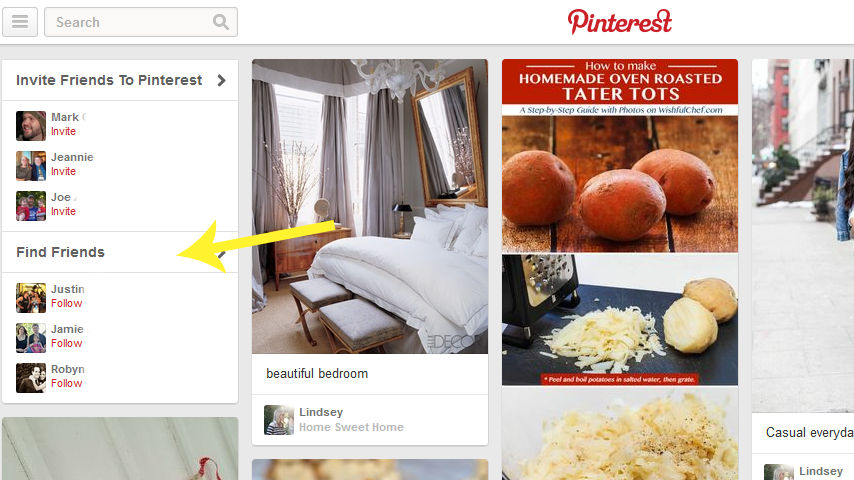
The next step is to follow follow follow!  Pinterest suggests people you may know through the social media sites you connected with, as you see in the example above.  So, if you connected to your Twitter and Facebook, you will see suggestions of people you are friends with on those sites. You can also invite friends who don't have accounts set up, but are your friend on Facebook or Twitter.  

You can also go to blogs you love and find their pinterest follow link, or just search for topics of interest in the search bar and follow new people that way!  Of course you could also go to a Pinterest link up and find new people to follow in the link up as well.

There are two ways to follow people.  In the left picture above you see Ellie's account and the "Follow All" button.  Simply click to follow all her boards.  That means you will see all her new pins in your feed and will also automatically follow any new boards she creates.  You can also follow only specific boards from people's accounts, if only those are of interest to you.  In the example to the right, I am choosing to only follow her "color inspiration" board.  However, for maximum pinterest activity, it is always nice to follow all the boards.

The next thing you should do is to create and organize your boards.  Boards are groups of pins organized by a certain topic.  For example:


In this example we see Rachel has 52 boards and these are the four at the top.  When you pin or repin something you choose which board to place that pin into, so you can keep all your pins organized.  You can create new boards using the "create a board" button to the left, or when you pin a new pin you can create a new board to fit that pin right in that screen!

So now we know the why to use Pinterest and how to set up your account.  But how can you make Pinterest beneficial to your blog?  Get started by pinning things from your blog!


There are several ways to add new pins, besides repinning pins from your news feed.  You can add your own pins in the following ways- click the red + button next to your account name.  You can upload a pin or add from a website here.  But, as the picture above shows, the best way to add new pins is by installing the "Pin It" button to your web tool bar.  Simply click the link "The Pin It Button" and then follow the instructions to install it to your browser tool bar.

Once that is installed, you can pin from any site!  When you see something you like, or want to share from your own blog just click the pin it button, choose the picture you want associated with that link and the board you want to pin it to and then pin it!

Quick Tips for Pinterest-Blog Harmony:
 These tips are good to keep in mind when you are linking up with Pinterest hops, like ours, as well!

Tip 1: Be sure to have an attractive image in your post if you want people to pin it!  Pinterest is visual, so if your post is just words with no pictures, it is very unlikely to get pinned.  (if you link up to a pin party like our hop, and your post does not have a picture or graphic of some sort, it will not get pinned)

Tip 2:  Add a short description with key words that will direct people to your pin when they search.  Hash-tags are not necessary.  A pin with a good description will rate high on the search list and get more traffic.  For example: "5 tips for traveling with kids" instead of "Our family trip to the beach."

Tip 3: When linking up to pin parties or hops, be sure to link up to the exact post you want pinned, not just your blog URL.  If you link up to your blog, the host of the party will not know which post you want pinned, and you will likely get no pins from that party because of it.

I hope All About Pinterest Part 1 was helpful to you!  

Stay tuned tomorrow for more advanced Pinterest tips including: adding the pin it button to your blog posts, how to properly repin, special tips from pinning expert Ellie and more!


Connect with us!
Bloglovin //Twitter //Pinterest //Facebook

Friday, June 14, 2013

Friday Five: 5 Tips for Planning a Date Weekend


This week's Friday Five post comes to us from Kelly who writes over at the blog Besote!  

Here are her 5 tips for planning a date weekend:

1. Check Priceline. The ability to bid on a hotel price may intimidate some, but you learn the game and come out a winner. $50 a night for a Marriott just outside the city is not a bad deal.  We've used this website many times and luckily, we have never been disappointed.

2. Check discount sites like groupon, living social, goldstar and whofish for things to do in town. Often, you can find deals for tours, restaurants, shows, and museum discounts that might be exactly what you're looking for.

3. Theme it up. We were engaged in Paris. As a result, it becomes fun to reminisce about our time there and sip coffee in Parisian-style bistros. Love Rome? Sip cappuccinos in a local coffee bar. Barcelona your thing? Find a tapas bar and bon provecho!

4. Culture Club. Find a local museum and see what's on exhibit. Attend the local philharmonic. See what's going on in town. New York has scores of options, and smaller cities have much to offer as well.

5. Second Honeymoon. Weekends away are a great time to break from the routine. Let romance rule the day and soak up the love. You'll have to go back to work soon enough. Enjoy the time together just being together.

To see the original post on Kelly's blog click here!

Connect with us!
BloglovinTwitterEmailRSSPinterestFacebook

This week's Friday Five was written by Kelly of Besote.  Kelly is a Northeast blogger in Boston who loves cooking shows, has been skydiving and met her husband at an ice-cream stand!